MES, CMMS, SPC, LMS, CIL, Warehouse: which system solves each plant problem
Too many acronyms, vendors claiming they do everything, and a spreadsheet nobody wants to let go of. This guide starts from the problem you feel on the shop floor and gets to the system that solves it — with the KPI that should move and the signs that it’s time.
Why it’s so easy to get lost when buying industrial software
Search for plant software and within minutes you’ll find MES, MOM, CMMS, EAM, QMS, SPC, LMS, WMS… Every vendor uses the acronyms their own way, almost all of them claim to do everything, and demos show beautiful screens — rarely the problem you need to solve tomorrow morning.
The outcome is familiar. The company buys by acronym, not by pain. It licenses a huge system and uses a fraction of it, or buys four tools that don’t talk to each other and starts typing the same information in four places. A year later, the side spreadsheet is still alive.
The right question isn’t “which system should I have?” but “which problem do I want to stop having?”. Every industrial system exists to move a specific KPI. If you know which KPI hurts, you know where to start.
In this guide we use the modules of the ProMOS™ platform as a concrete example, because we know every screen from the inside. But the logic applies to any vendor: link the symptom to the system, the system to the KPI — and only then look at the screens.
Seven systems, seven different questions
Each system answers a question the plant asks every day. Click a card to jump to the explanation.
How much did we produce, how much did we lose, and why?
OEECMMSMaintenanceIs equipment being cared for before it breaks?
MTBF · MTTR · complianceWarehouseMaterials & spare partsIs the right part on the shelf when maintenance needs it?
Below minimum · stock valueSPCProMOS™ QualityAre product and process within limits?
% NOK · Cp/CpkLMSTrainingWho is qualified to do what — and until when?
Expired · % approvalCILCleaning, inspection, lubricationAre basic equipment conditions up to date?
% compliance · % NOKContractorsContractor ManagementAre contractor companies and workers’ documents up to date?
% complianceAP · FMEA · LABEL · LOGWhat connects it allAction plans, failure analysis, anomaly tags and logbook: the modules that move the problem to whoever solves it.
See the platformFrom symptom to system
Find the sentence you’ve already heard in the morning meeting. Next to it: the system that tackles the problem and the KPI that should change.
| What you hear in the plant | System | KPI it moves |
|---|---|---|
| “I don’t know why the line stops — and every shift tells a different story.” | MES | OEE, top stops, availability |
| “The production number comes from a spreadsheet filled in at the end of the shift.” | MES | OEE by shift, operator and product |
| “Preventive maintenance is late and the same machine breaks down again.” | CMMS | MTBF, MTTR, % plan compliance |
| “Maintenance waits for parts — and the storeroom is full of things nobody uses.” | WarehouseCMMS | Items below minimum, idle stock, shortage forecast |
| “Quality checklists on paper; at audit time, nobody can find the record.” | ProMOS™ Quality | % NOK, record traceability |
| “The process drifts and scrap shows up without warning.” | SPC | Cp, Cpk, control charts |
| “Expired training; a skills matrix in a spreadsheet nobody updates.” | LMS | Expired trainings, % approval |
| “Cleaning, inspection and lubrication depend on whoever remembers on shift.” | CIL | % plan compliance, % NOK |
| “Contractor documents arrive by e-mail and expire without anyone noticing.” | Contractor Management | % compliance, expired documents |
| “An action was agreed in the meeting and nobody knows who owns it.” | AP | Actions with owner, due date and status |
MES: to see where the line’s time is going
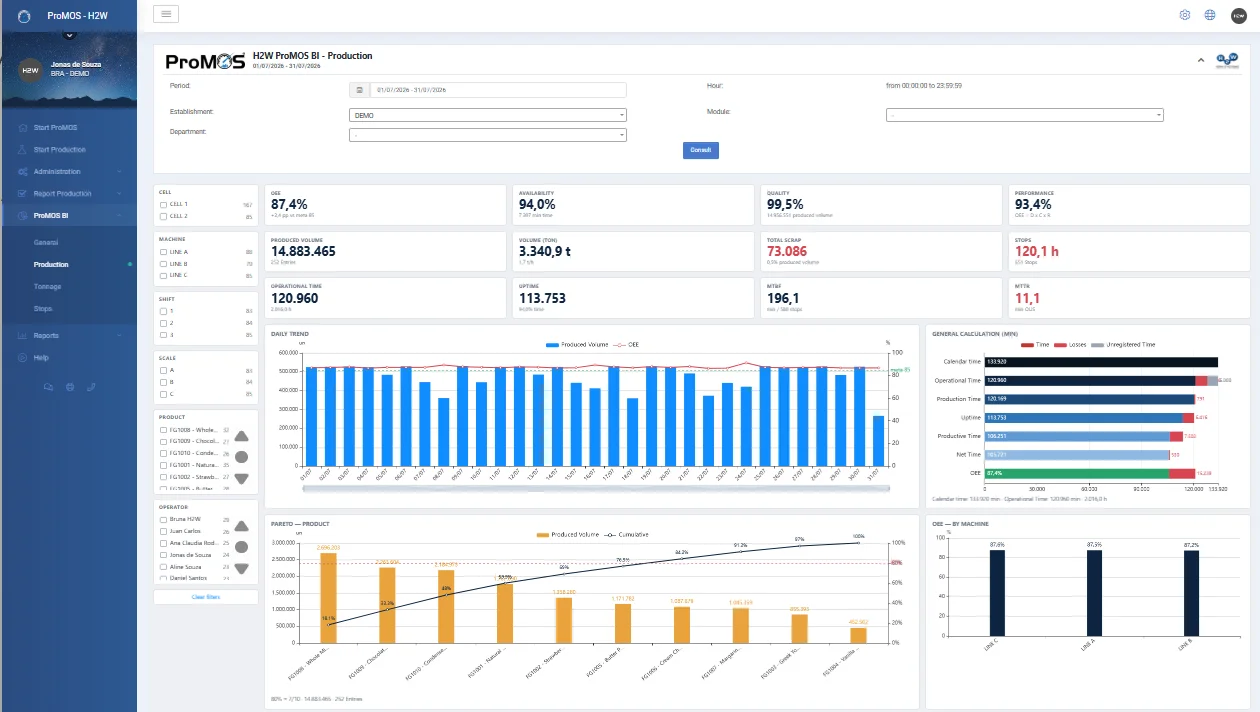
An MES (Manufacturing Execution System) records what happens in production, shift by shift: orders, volumes, stops and losses. From that it calculates OEE — availability, performance and quality — and shows where the loss is.
It solves the plant’s most expensive problem: capacity that exists, has already been paid for, and leaks away in stops, slow running and scrap without anyone being able to say how much. For the KPI in detail, see the visual OEE guide.
What it needs to deliver
- Production entries by order, shift and operator, with validations (no overlaps on the same machine, no entries without rate or operator).
- Stops with configurable reasons and automatic Pareto; non-operating periods that don’t count as a loss.
- Open OEE calculation, KPI by KPI — no magic number.
- Line panel for the shop-floor TV, with shift OEE against target and the top 5 stops.
- ERP interfaces and automatic capture of counts and stops from PLCs, sensors or SCADA systems.
Signs you need it
- OEE is calculated in a spreadsheet, by someone, days after the fact.
- The daily meeting argues about whether the number is right, not about the cause of the loss.
- Nobody can say which stop cost the most this month.
CMMS: to get maintenance out of firefighting mode
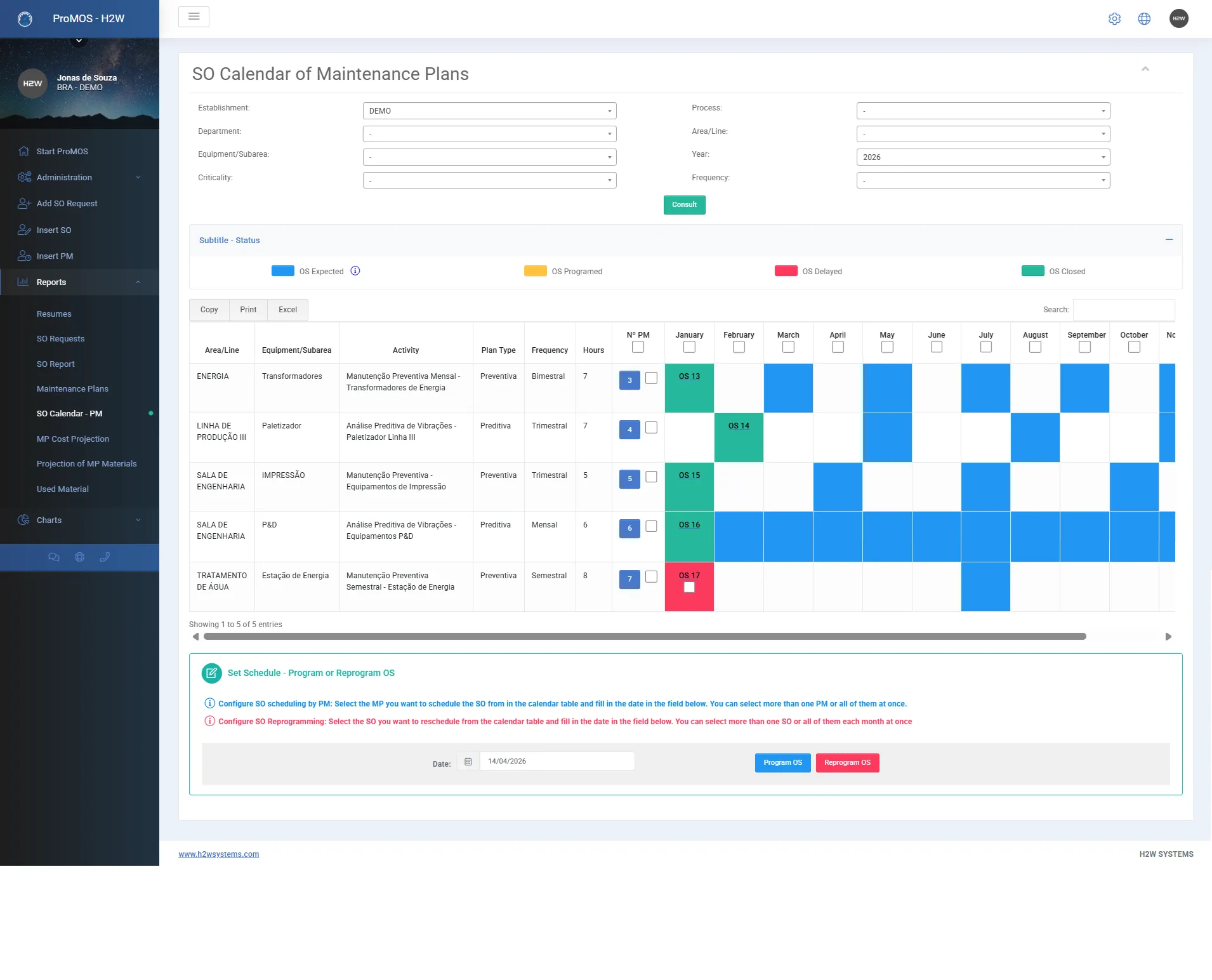
A CMMS (Computerized Maintenance Management System) organizes the maintenance team’s work: equipment records and data sheets, service requests, work orders, preventive and predictive plans, costs.
It solves maintenance that lives on breakdowns — where preventive work exists on paper but slips on the calendar, and nobody knows what each asset costs to keep running.
What it needs to deliver
- Asset hierarchy (area, line, equipment, component) with data sheet, attachments and full history for each asset.
- Requests from any area, reviewed by maintenance before becoming a work order.
- Preventive, predictive, metrology plans and inspection and lubrication routes that generate work orders automatically and reschedule the next one on closure.
- Total work-order cost: hours × hourly rate, materials and parts, contractors and rentals.
- Calendar with forecast, scheduled, overdue and closed orders, with batch rescheduling.
Signs you need it
- Preventive maintenance is tracked in a spreadsheet or on a wall board.
- Equipment history lives in the head of the most senior technician.
- The maintenance budget is discussed without knowing where the money went.
Warehouse: so the part is there when maintenance needs it
An industrial storeroom system controls materials and spare parts: receipts, reservations, issues and inventory, with the average cost updated automatically.
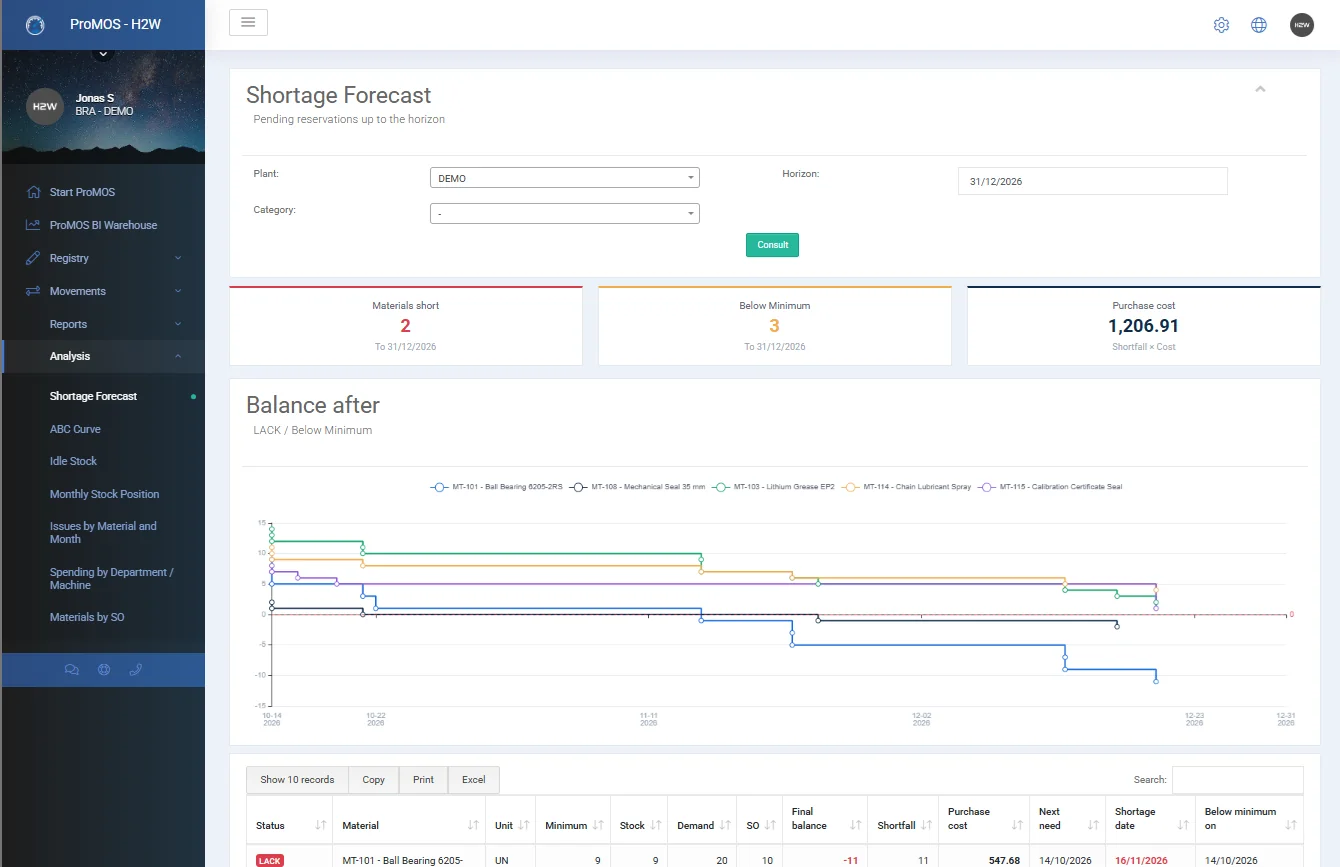
It sounds administrative, but this is where many long stops are born: the work order is open, the technician is ready, and the part isn’t on the shelf. On the other side, stock piles up with items nobody uses — idle money.
What it needs to deliver
- Receipts with supplier, invoice and value; issues valued at the current average cost.
- Reservations with an expected issue date, blocking the withdrawal of quantities already reserved.
- Minimum stock, a reorder list with supplier and an ABC curve of consumption.
- Idle stock with no issues for 30, 60, 90, 180 or 365 days, with value.
- With the CMMS: a single parts catalog, work-order parts reserved automatically and issued on closure, plus a shortage forecast from scheduled orders.
Signs you need it
- System balances don’t match the shelf.
- Emergency purchasing has become routine.
- Nobody knows how much money is sitting in spare parts.
ProMOS™ Quality and SPC: to take quality off paper and stop the process from drifting
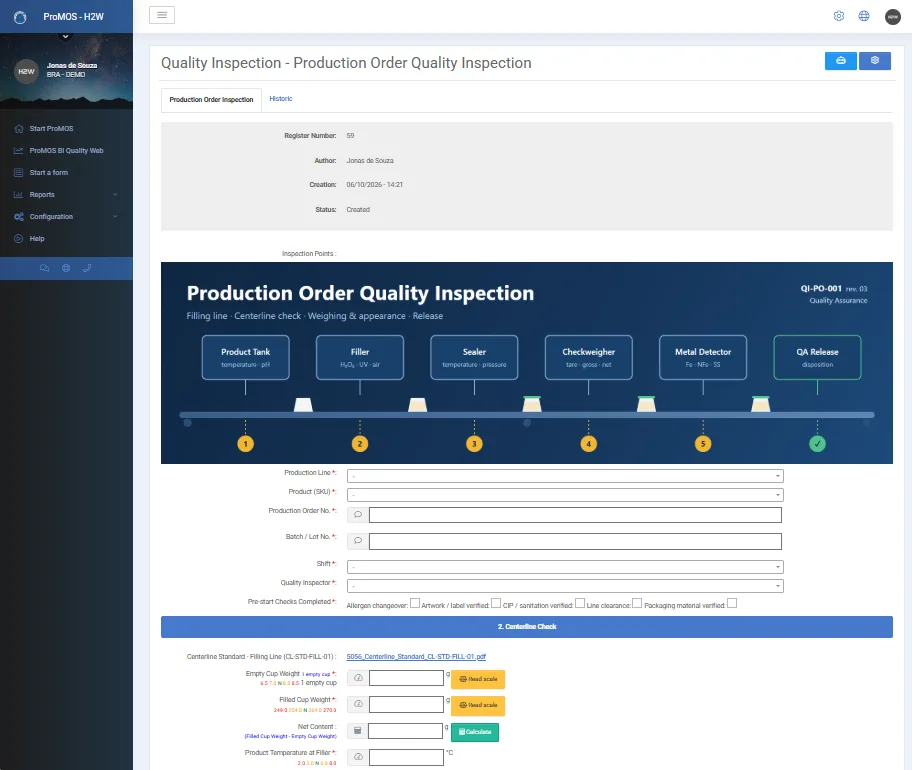
Two needs go hand in hand here. The first is digitizing quality records — checklists, centerlines, lab analyses, batch release, audits — that live today on clipboards and in binders. The second is SPC (Statistical Process Control), which uses that data to show whether the process is stable and capable.
In ProMOS™, both live in the same module, ProMOS™ Quality (Quality Web). And process stability isn’t only a quality topic: in a study of 25 lines, process capability explained 87% of OEE variation.
What it needs to deliver
- Forms created and changed by your own team, no programming — including with an AI assistant, from a description, a photo of the paper form, a PDF or a spreadsheet.
- Per-product limits: each value becomes OK, NOK or Regular as it is entered.
- Direct scale reading in numeric fields (add-on).
- History of who filled in, changed and validated, with old and new values for each field.
- Control charts, histograms, Cp and Cpk; action plans opened straight from the nonconformity.
Signs you need it
- The auditor asks for a record from six months ago and someone walks to the archive.
- Drift is only noticed when the customer complains.
- The form changes and everything has to be reprinted.
LMS: to know who is qualified to do what
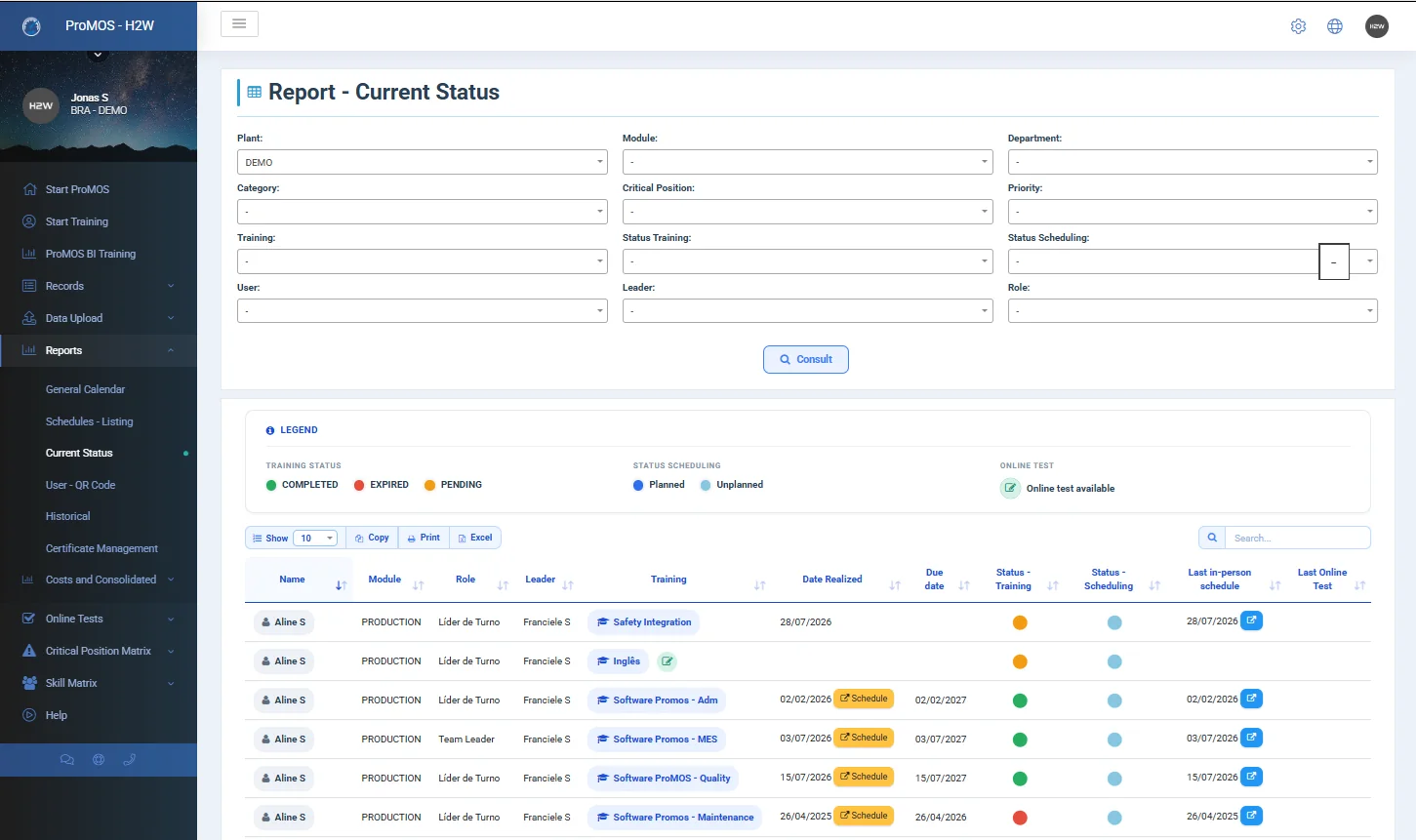
An industrial LMS (Learning Management System) manages trainings, refreshers and certifications — safety regulations, internal procedures, critical positions.
It solves a silent risk: the training expires, the spreadsheet doesn’t warn anyone, and the person keeps operating until an audit or an incident exposes the gap. It also answers a question production asks all the time: who can cover this role today?
What it needs to deliver
- Mandatory audience by employee, job title, department, cost center or critical position, updated automatically with every change.
- Online tests with a question bank, minimum score and a renewal test released 3 months before expiry.
- Classroom sessions with QR Code attendance and certificates with digital signatures.
- Critical-position and skills matrices, with each person’s proficiency level.
- E-mail alerts for expirations, pending items and call-ups, to the employee and the supervisor.
Signs you need it
- The skills matrix is a spreadsheet with several versions.
- Expirations are discovered after they expire.
- Nobody can say who covers a critical operator during vacations.
CIL: to make autonomous maintenance actually happen
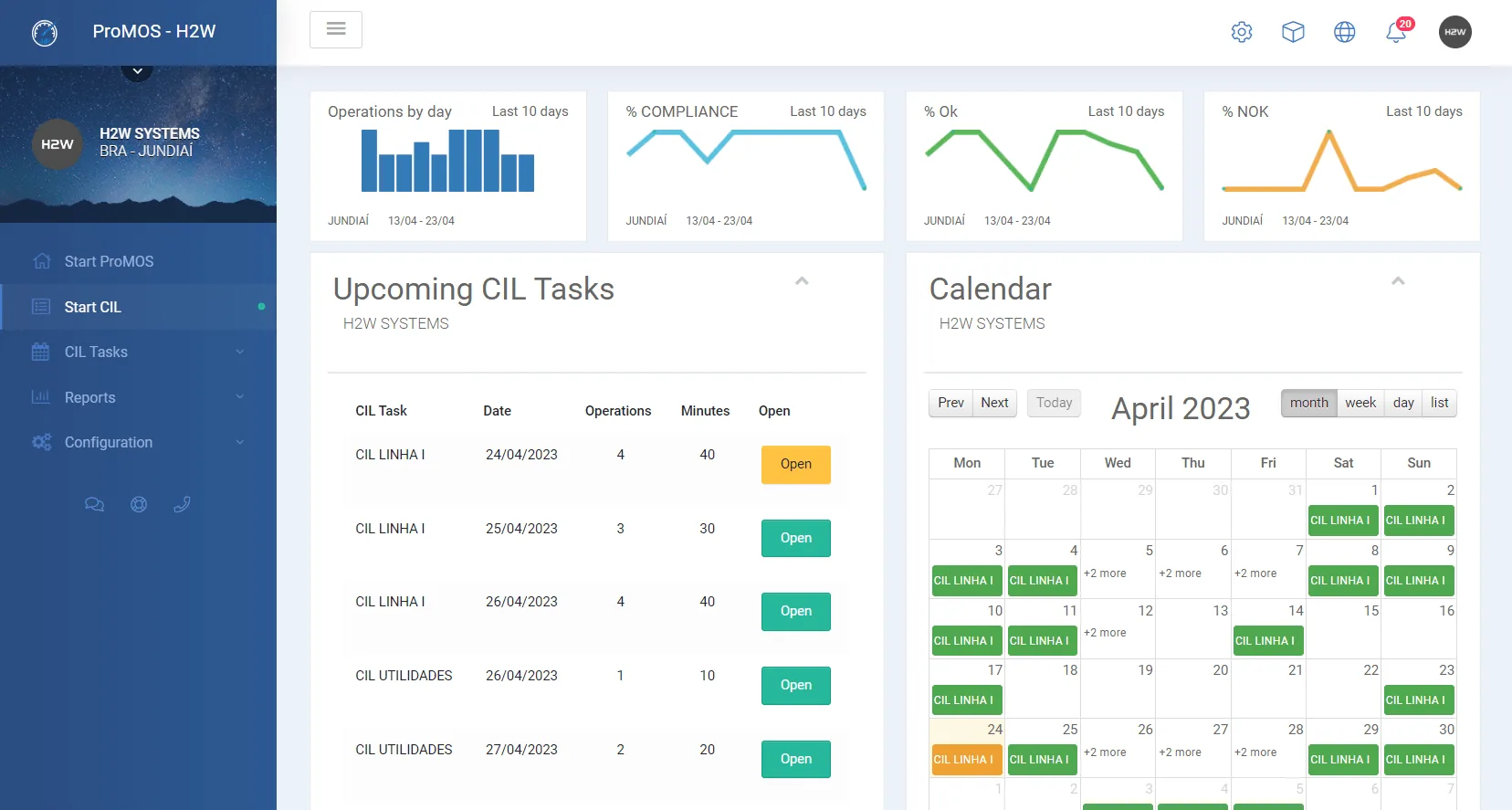
CIL stands for cleaning, inspection and lubrication — the autonomous maintenance routines operators perform themselves to keep equipment in basic condition.
It’s different from a CMMS: that’s where the maintenance team’s work lives; this is the daily care of the people who run the line. CIL solves routines that depend on someone’s memory and the small defect that, unseen, turns into a stop.
What it needs to deliver
- Tasks by line, cell and equipment, with standard, method, expected time and machine condition (running or stopped).
- PPE, lockout/tagout (LOTO) procedures and one-point lessons (OPL) shown right in the operation.
- Frequencies from daily to yearly, with early and late tolerance rules and an inspector roster.
- OK/NOK execution on a computer, tablet or smartphone.
- Defects recorded during execution generate a tag in LABEL (when licensed).
Signs you need it
- The CIL board has tasks signed off in bulk at the end of the week.
- Nobody knows the real adherence to the routines.
- Lubrication is remembered when the bearing is already making noise.
Contractor Management: so contractor documents don’t expire in silence
Every plant hosts contractor companies — maintenance, construction, cleaning, specialized services. Each must provide company documents (articles of incorporation, occupational health and risk programs, life insurance) and documents for each worker (medical fitness certificate, PPE record, safety certifications such as electrical work, confined spaces and work at heights).
When this circulates by e-mail and in folders, nobody really knows who is compliant. The ProMOS™ Contractor Management module centralizes the rules and has the contractor itself upload and track its documentation.
What it needs to deliver
- Catalog of company and worker requirements, each with acceptance criteria, applied automatically by service type.
- Contractor portal: e-mail invitation, PDF document upload and tracking of what is pending, about to expire, expired or rejected.
- Validation as approved/rejected, with expiry date and comment — and expirations tracked automatically.
- AI-assisted validation: checks the document type, registration data and acceptance criteria, extracts the expiry date and suggests a result, always reviewable by your team.
- Online induction with mandatory videos and a test before plant access.
Signs you need it
- An expired medical certificate is discovered at the gate.
- The safety or HR team spends days checking PDFs.
- Inductions are repeated because there’s no record of the last one.
Separate systems work. Connected, the gains multiply.
There’s no obligation to buy everything together — and there shouldn’t be. Each ProMOS™ module works on its own and is optional. But plant problems rarely respect department boundaries: a production stop is a maintenance problem, which depends on the storeroom, which depends on who is trained.
With separate systems, that conversation happens by e-mail, phone and re-typing. With connected systems, it happens by itself. Four concrete examples:
The stop becomes a work order; the order’s parts are reserved for the scheduled date and issued from stock on closure. MTBF and MTTR come from the same stops that feed OEE.
The nonconformity opens an action plan right in the form, tracked together with the action plans from the other modules.
The defect found in the operator’s routine becomes a tag and goes to whoever fixes it — before it turns into a stop.
In loss analysis, “was the operator trained?” stops being a guess: training status sits in the same database as production.
Separate systems
- Machine, product and person registered again in every system.
- Analysis stops at the boundary of each tool.
- Every integration between two systems is a separate project.
- The same data typed twice — in two versions.
Connected platform
- Single master data: equipment, products, employees and materials shared.
- The KPI is where analysis starts: recurring failures? CIL up to date? Preventive done? Parts available? Did SPC show drift? Operator trained?
- Native ProMOS BI in every module, with no extra Power BI license.
- Interfaces with ERP, SCADA and PLCs, following the company’s rules.
Ready to deploy, built to adapt
ProMOS™ is a proven industrial platform used by large manufacturers. It arrives ready to use and is configured to each company’s rules, calculations, reports and screens.
It isn’t a closed product: what’s missing can be added later, and each customer has its own environment and database. Start with one module and connect the others when it makes sense.
Start with the pain that costs the most — and grow with maturity
There’s no mandatory order. There’s the order that pays the bill first. Two ways to decide:
By pain
“I’m losing capacity and don’t know where”
Start with MES on a pilot line. Once stops are measured, the CMMS comes in to attack those caused by failures.
“Maintenance lives on breakdowns”
CMMS and Warehouse together, so plan and part move side by side. Then CIL brings basic care to the operator.
“Audits and customer complaints”
ProMOS™ Quality, starting with the most critical forms; SPC on the variables that define the product.
“People and compliance risk”
LMS for your own employees; Contractor Management for contractor companies and workers.
By maturity
Get off paper
Record at the point of execution: production entries, quality checklists, CIL routes, trainings.
Goal: reliable data, same day.Connect
Link the modules: stop → work order, NOK → action plan, order → reserved part.
Goal: the problem travels by itself to whoever solves it.Analyze and anticipate
SPC with Cp and Cpk, MTBF and MTTR, plan compliance, ProMOS BI and PLC and ERP interfaces.
Goal: act before the loss.Three things to check when buying. Ask for a demo built on one of your problems, not the vendor’s script. Ask who changes forms, stop reasons and rates after go-live — in ProMOS™, the plant’s own team. And make sure the KPI calculation is open and auditable.
Questions about industrial systems
What is the difference between MES and ERP?
The ERP runs the business: orders, purchasing, accounting inventory and invoicing. The MES runs what happens on the line, minute by minute: production, stops, losses and OEE. They complement each other: the ProMOS™ MES can receive master data and scheduled orders from the ERP and send order results back, with no re-typing.
Do I need to buy all modules at once?
No. Each module works on its own and is optional. The most common path is to start with the most expensive pain and add modules as the operation matures. When connected, data flows from one to the other with no re-typing.
Don’t CMMS and CIL do the same thing?
No. The CMMS organizes the maintenance team’s work: work orders, preventive plans, costs and equipment history. CIL organizes autonomous maintenance done by operators: cleaning, inspection and lubrication. They complement each other: a NOK in CIL becomes a tag and the defect is handled before it turns into a stop.
Are SPC and ProMOS™ Quality the same thing?
SPC (Statistical Process Control) is a technique; ProMOS™ Quality is the module that digitizes quality forms and, with the recorded data, produces control charts, histograms, Cp and Cpk. In practice, you get the records and the statistics in one place.
Does the system adapt to my plant’s rules?
Yes. ProMOS™ arrives ready, in its standard version, and is configured to each company’s rules, calculations, reports and screens. Day-to-day parameters — stop reasons, rates, forms, document requirements — are managed by the plant’s own team. Whatever doesn’t exist can be developed later, because each customer has its own environment and database.
Not sure which system to start with?
Tell us which problem costs your plant the most. We’ll show you the right module, with real screens, and what it can move in your KPI.