ProMOS® — CMMS
CMMS Software — Industrial Maintenance Management
Module that connects maintenance planning, execution and performance. Corrective and preventive service orders, integrated warehouse and real-time indicators.
What is CMMS Software and why does your industry need it?
A CMMS software (Computerized Maintenance Management System) is the central tool to digitize and optimize all industrial maintenance management. With ProMOS® CMMS, your team operates with digital work orders, automated preventive maintenance plans and real-time performance indicators — eliminating spreadsheets, paper and rework.
Efficient maintenance management reduces machine downtime, increases equipment availability and controls repair and material costs. ProMOS® CMMS integrates planned and corrective maintenance in a single system, with MTBF, MTTR, backlog and cost-per-cost-center dashboards.
Built for manufacturing industries, the software is 100% web, accessible from any device, and can be integrated with your ERP for automatic materials and inventory synchronization. Fully customizable to your operation’s processes.
Features
What the CMMS module does
Corrective Work Orders
Registration and management of corrective work orders with failure history, responsible technician, parts used and resolution time.
Preventive Maintenance
Preventive work order planning with calendar, configurable frequency and execution tracking by equipment and area.
Integrated Warehouse
Spare parts inventory control and consumption per work order. Part reservations and purchase requisitions automatically generated by the system.
KPIs & Indicators
Dashboards with MTBF, MTTR, equipment availability, costs by area and plan vs actual comparison.
TPM Tags (Defects)
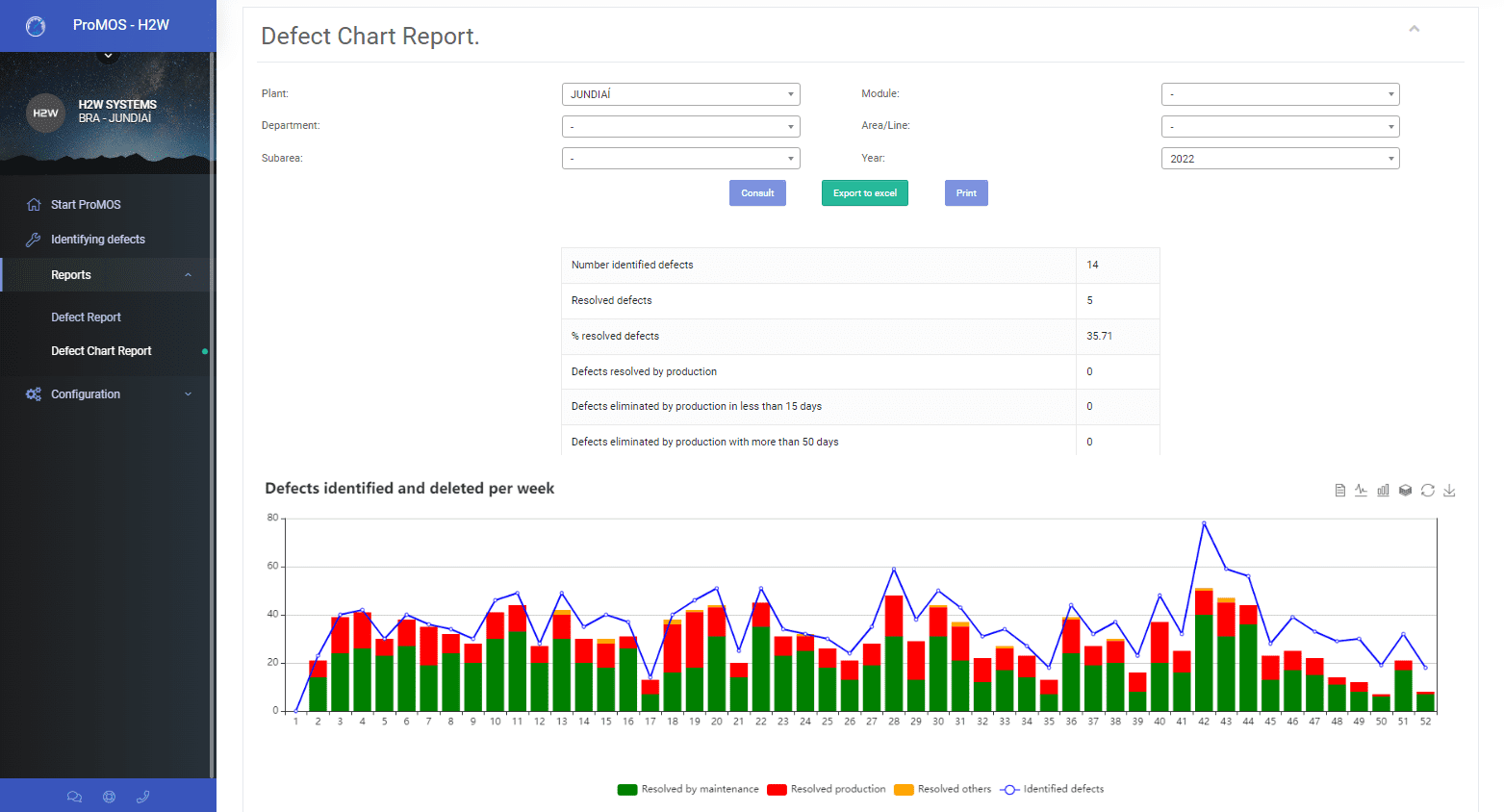
Identification and treatment of defects in equipment and areas of the company. Real-time visualization by criticality, type and location.
Automatic Alerts
Notifications via e-mail, Telegram and WhatsApp for overdue work orders, upcoming preventive maintenances and minimum stock alerts.
Real Impact
Metrics that transform maintenance
Increase in mean time between failures with well-planned preventive maintenance
Reduction of mean time to repair with failure history and available parts
Reduction in maintenance costs with warehouse control and plan vs actual tracking
Increased equipment availability with up-to-date preventive maintenance and quickly resolved defects
ProMOS® CMMS
Corrective and Preventive in the same system
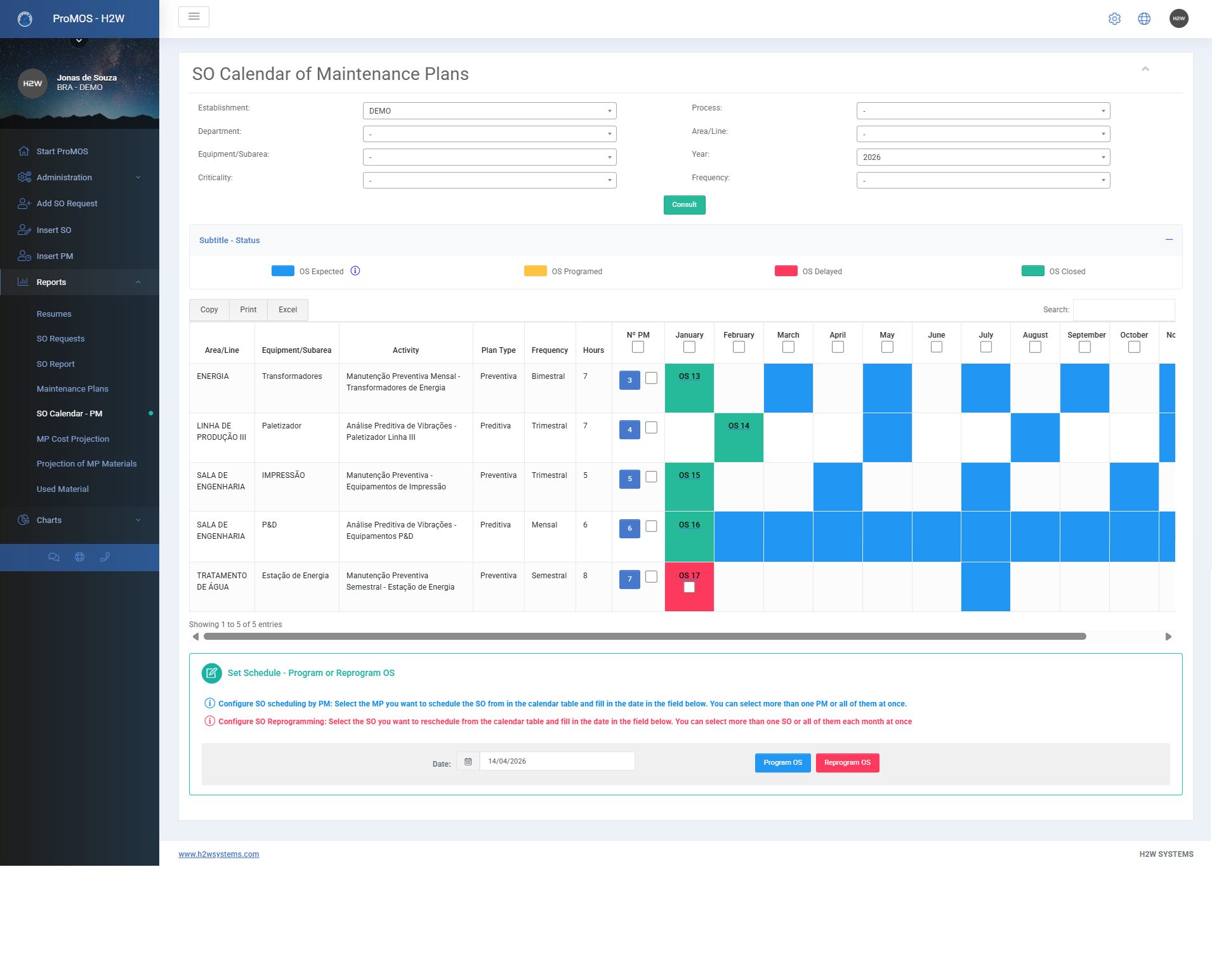
The CMMS module connects preventive maintenance plans with the execution of corrective work orders. The system automatically generates preventive work orders according to the configured calendar and frequency, and the entire team can see what needs to be done each shift.
Contact Us
Warehouse & Costs
Full control of parts and costs
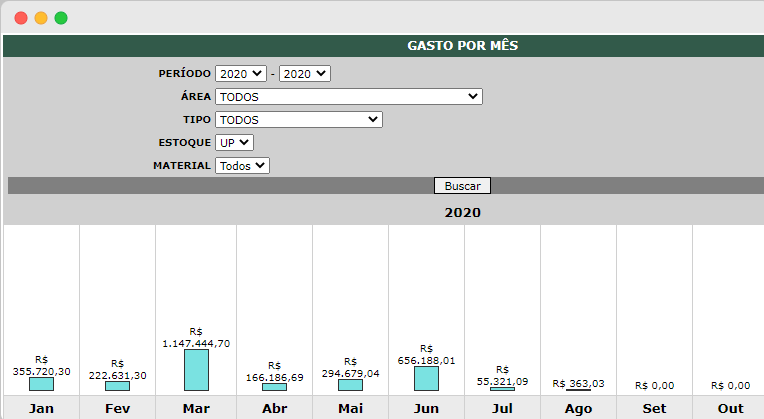
The warehouse is fully integrated with the maintenance module. When a work order is closed, parts used are automatically deducted from stock. The system generates cost reports by equipment, area and period, allowing complete financial management of maintenance.
- Stock calculated in real time from entry and exit records
- Purchase requisitions automatically generated when minimum stock is reached
- Cost analysis by work order, equipment, area and period with charts and reports
- Consumption projection from the last 6 months for purchasing planning
ProMOS®
More module features
Features that make ProMOS® CMMS the complete solution for industrial maintenance.
- Definition of responsible parties by equipment, area and maintenance type
- Inclusion of photos and files in work orders and defect tags
- MTBF and MTTR reports by equipment, machine, area and period
- ERP integration for equipment import and export of closed work orders
- Browser access on PC, tablet and smartphone — no installation required
ProMOS® CMMS
Ready to transform your plant maintenance?
Contact our team and find out how ProMOS® CMMS can adapt to your operation.
Features
What the module delivers
The main features, for those who want to check item by item — and there's always more than fits here:
Main module features
Guided deployment
The module arrives ready to use, with the plant's own equipment structure, specialties and maintenance team.
- Initial setup of specialties, technicians, materials and equipment, together with the maintenance team.
- Individual access per person: general administrator, planner/technician (schedules and executes, but does not administer) and regular user (requests services and views reports).
- Key-user training on work orders, preventive plans and indicator analysis.
Master data and equipment records
The maintenance base is configured by your own team: who executes, with which specialty, which materials and on which equipment. Every asset has its complete record.
- Specialties (mechanical, electrical, instrumentation), technician types and technicians — in-house or third-party.
- Materials and spare parts, with unit and cost, used in orders and plans.
- Equipment record by area, line and asset: TAG, manufacturer, model, asset number, criticality, dimensions, weight, voltage and parts.
- Attachments per asset: manufacturer manuals, drawings, photos and technical instructions.
- Full asset history: every work order and plan linked to it.
Service requests
Any area requests maintenance through the system — no paper, phone calls or lost messages — and tracks the status until the answer.
- Request with number, date, area, line, equipment and problem description.
- Maintenance review: approved or rejected, always with justification and comments.
- An approved request becomes a work order, keeping the link between request and executed service.
- Request report by status, area and period.
Work orders and maintenance costs
Every corrective or preventive job recorded from opening to validation: what to do, who does it, how long it takes and what it costs — logged in the asset's history.
- WO with number, type, criticality, specialty, area, line, equipment and part, scheduled and actual dates.
- Activities in sequence, with description and technician comments on each one.
- Technicians by type, with start/end times and planned vs. actual labor.
- Total cost added automatically: labor, materials and parts, third-party services and additional costs.
- Attachments and notes (photos, reports, third-party documents).
- Closing by the technician and validation by the supervisor — with justified rejection and reopening when the service is not accepted.
Preventive plans and calendar
Each plan carries everything the WO will need: sequenced activities, each specialist's time, materials, manuals and cost forecast. The calendar shows what is planned, scheduled, overdue and closed.
- Plan per asset, with frequency, criticality, responsible planner and inspection routes.
- Activities with description, time, technician type and quantity; planned materials and costs.
- Plan attachments: manuals, procedures and inspection instructions, available to the executor.
- WOs generated from the plan with activities, technicians and materials pre-filled; plan duplication for similar assets.
- Calendar with scheduling and rescheduling, last execution and the status of every order.
ProMOS BI Maintenance
Configurable reports in Power BI format, no Microsoft license required: service volume, plan compliance, labor usage and costs.
- WOs created, open, overdue and closed; open vs. closed vs. backlog; by status, cost and criticality — filtered by plant, asset, type and year.
- Plan compliance: % and planned vs. executed orders, month by month.
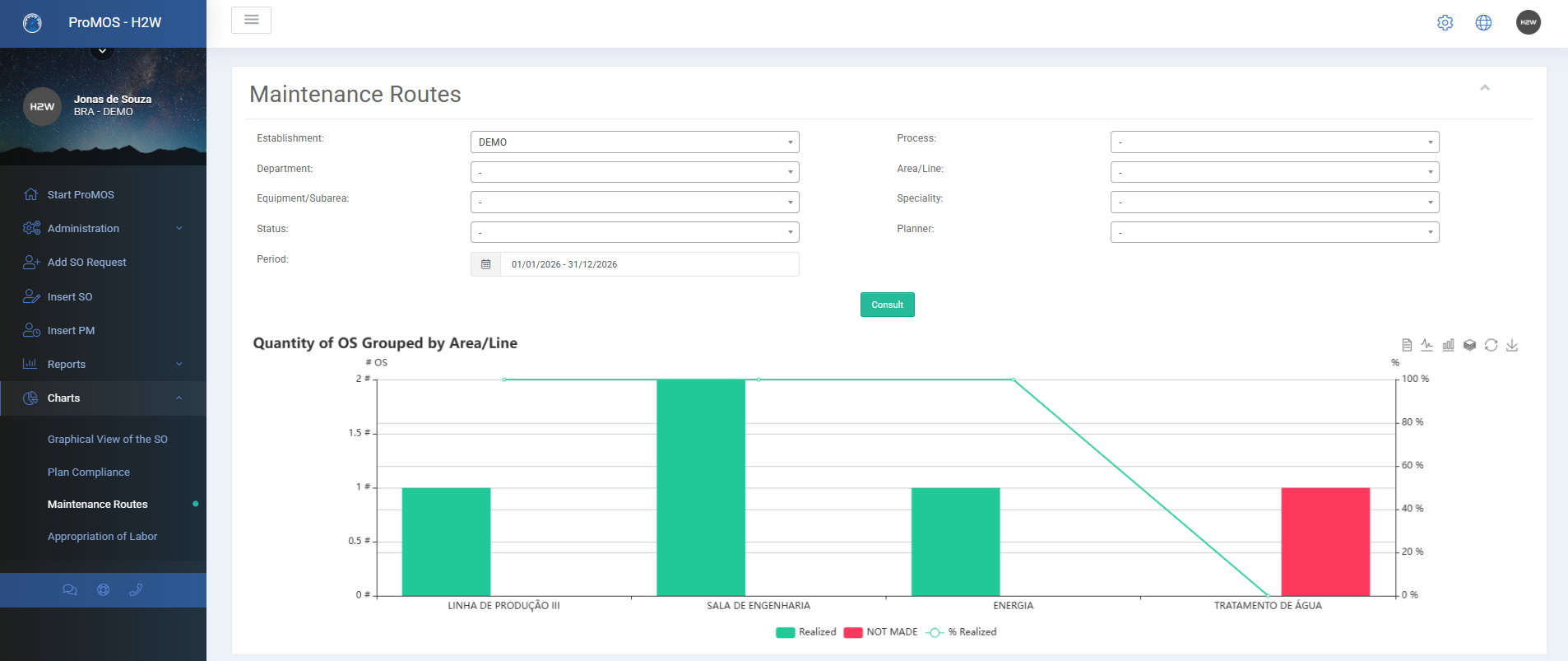
- Maintenance routes: done vs. not done by area, line, specialty and planner.
- Labor appropriation: hours per technician, specialty and month.
- Graphical view of WO costs: labor, materials and other costs.
Maintenance reports
For the team's daily routine and for budget planning, filtered by plant, area, line, asset and period.
- Reports on assets (records), requests, work orders and plans.
- Preventive-plan cost projection, for the maintenance budget.
- Preventive-plan material projection, for purchasing and spare-parts stock planning.
- Material usage by material, area and line; export to Excel.
ProMOS®